
Comprehensive photo editing and beautification tool
BeautyCam is a free, versatile photo editing and beauty enhancement tool designed to elevate portraits, selfies, and lifestyle photos effortlessly. It features professional-grade filters, intelligent retouching, and color correction within a clean, intuitive interface. Whether refining skin tones, adjusting lighting, or enhancing facial features, it helps users achieve polished, natural-looking results quickly without the need for advanced photo-editing experience.
Top Recommended Alternative

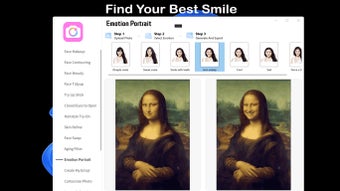
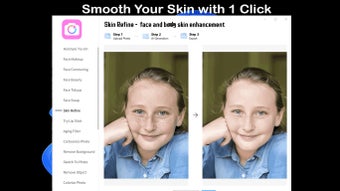
BeautyCam includes advanced beautification tools such as automatic blemish correction, skin smoothing, and real-time previews. It supports both subtle enhancements and artistic transformations, ensuring natural or creative results while maintaining efficient performance across various devices and image formats.
Editing features and customization options
BeautyCam provides an extensive selection of powerful and versatile multimedia editing tools that combine practicality with precision. Users can crop, rotate, and fine-tune exposure, contrast, and color balance. The filter library offers multiple preset styles, each adjustable in intensity for customized results. Additionally, its face recognition technology automatically detects key features, simplifying complex edits while maintaining accurate proportions and natural expressions.
The software also excels in convenience and workflow efficiency. Users can preview edits in real time, apply layered adjustments, and revert changes instantly without affecting the original file. It integrates collage creation, background blurring, and lighting enhancement tools, enabling creative compositions for both social media and professional use. Its lightweight performance ensures consistently smooth operation even during detailed, high-resolution edits.
While the software performs efficiently, it does have a few notable limitations. Some advanced options, such as manual retouching layers or AI-powered object removal, are restricted to premium versions. Additionally, users seeking precise control for color grading or RAW processing may find the customization options limited. Nevertheless, for everyday image enhancement, these shortcomings remain relatively minor. Similar apps to this are YouCam Perfect, Meitu, BeautyPlus, and Facetune.
A reliable and creative enhancement solution
BeautyCam offers a balanced combination of simplicity, beauty, and functionality. Its intelligent auto-enhancement tools and intuitive interface make it a reliable choice for refining portraits and personal photos with speed and precision. While it may lack some professional-grade editing options, its ease of use, smooth performance, and creative versatility make it a practical and enjoyable addition to any user’s digital tool kit.



















.png)